zdavoSign up your school

Under construction · together with you

We're building Zdavo together with you.

One system for students, instructors and driving schools: from booking lessons and the instructor's schedule to the work of the whole office. We're on the home stretch. See what already works and tell us what to improve.

Real screens of the app being built · sample data

What Zdavo is

The whole road to a driving licence in one system.

A driving licence is more than a student and an instructor. Along the way there's the office that puts the schedule together and the owner who keeps an eye on the cars and payments. In Zdavo everyone has their own view, and everyone works on the same, up-to-date data.

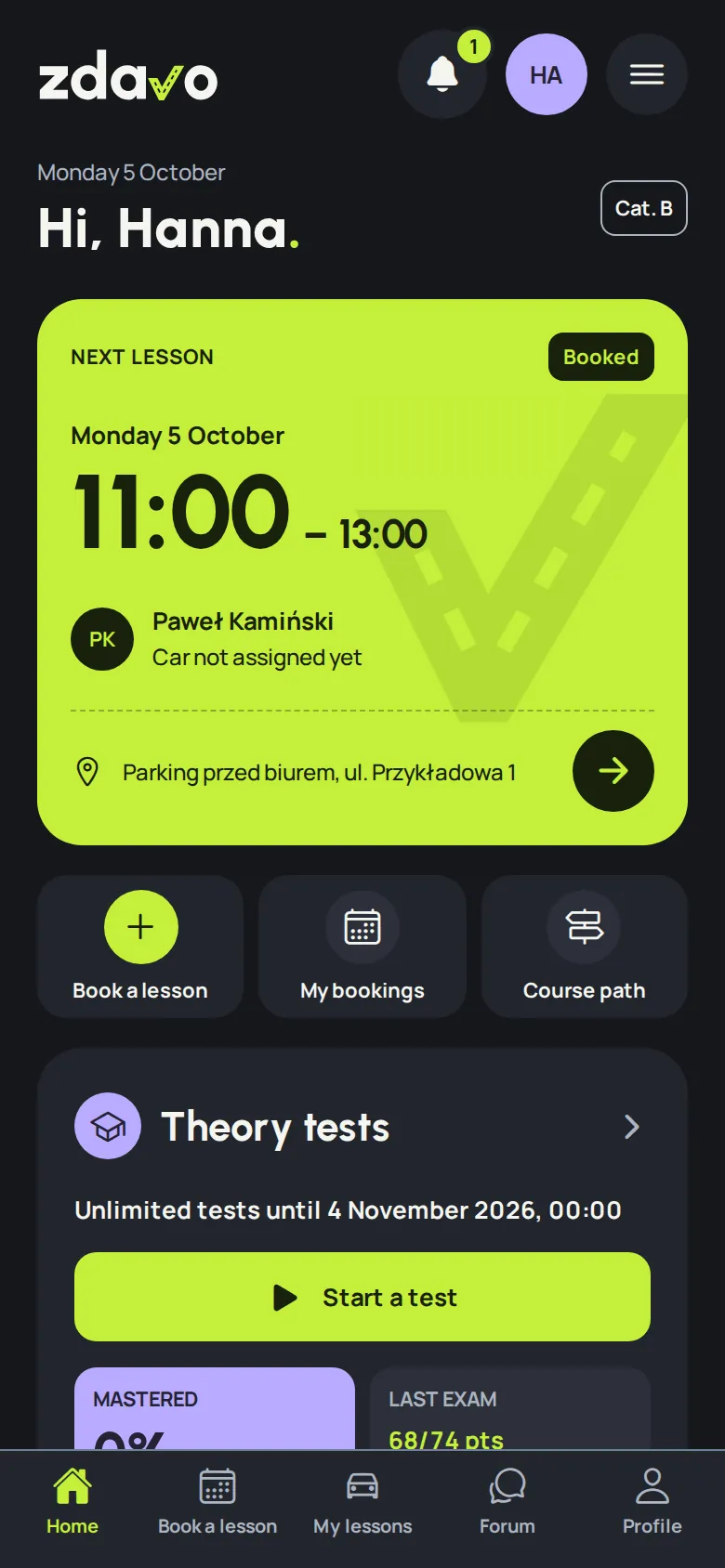
The student's home screen: the next lesson as a ticket, shortcuts and theory tests.
Student

You book lessons yourself, whenever suits you.

  • A calendar of free slots with all instructors or only the one you drive with.
  • Your next lesson as a ticket: time, instructor, car and meeting point.
  • Course progress: how many hours are behind you and how many are left to plan.
  • A mock exam just like at the exam centre, with a time limit for every question, a forum and reminders set up your way.
  • Slot sniper: lets you know when the slot you're hunting for frees up.
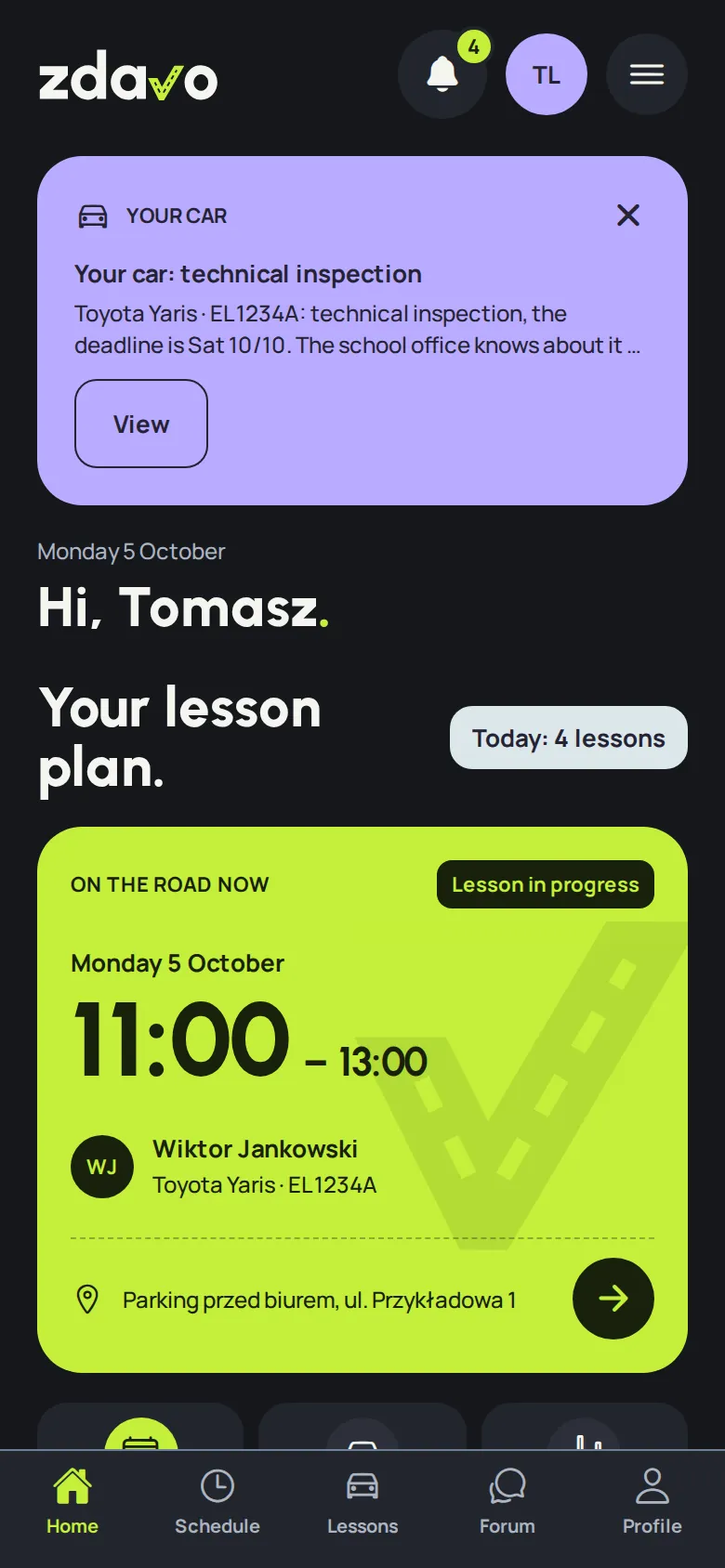
The instructor's home screen: the next lesson with a student and the plan for the day.
Instructor

Your schedule in your pocket and peace of mind.

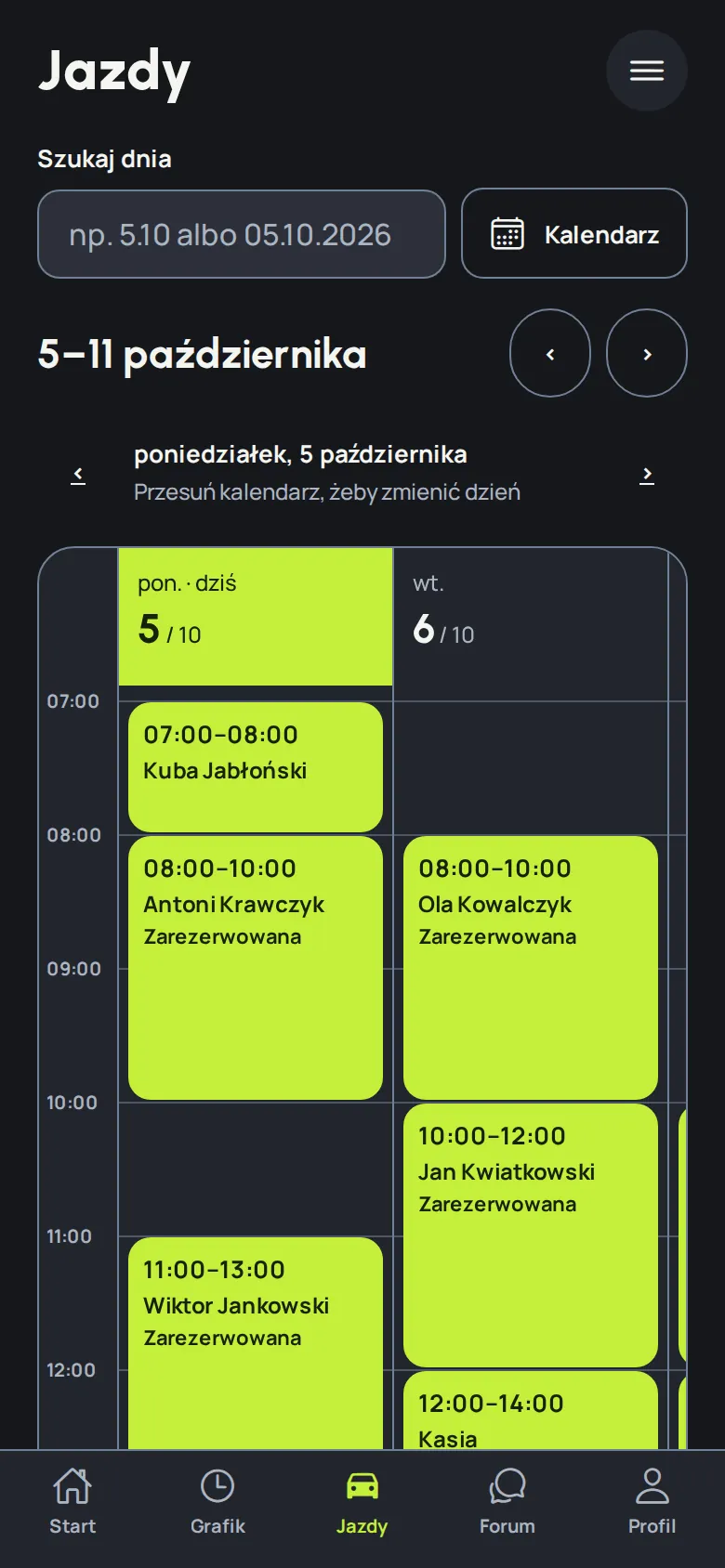
  • Day, week and month in one place. You publish your working hours in one move.
  • Students with their number at hand and the meeting point on a map.
  • Change of plans? You move the slot, hand the lesson over or swap the student.
  • A note after the lesson so the student knows what to practise next.
  • Monthly summary: hours driven and a forecast.
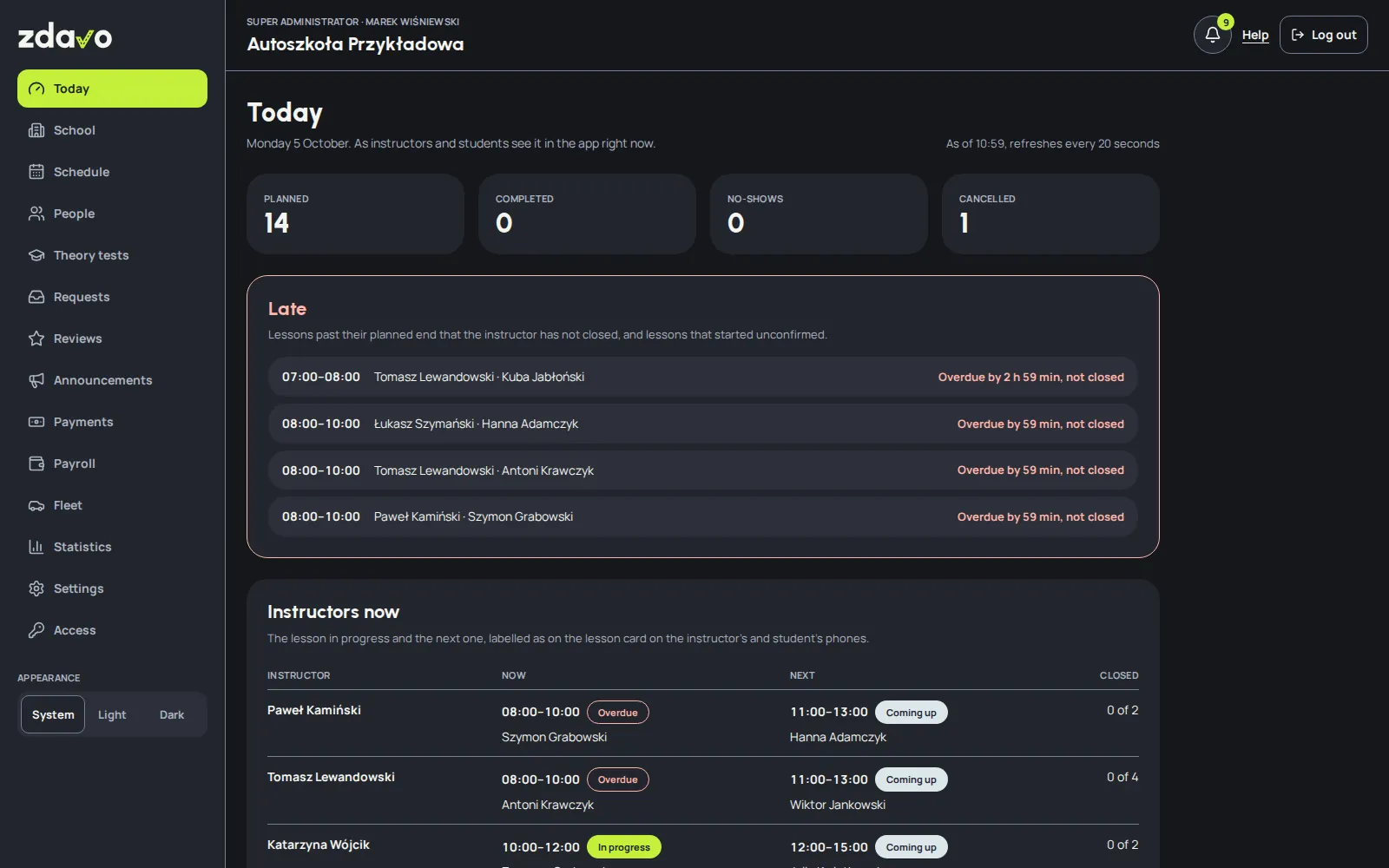
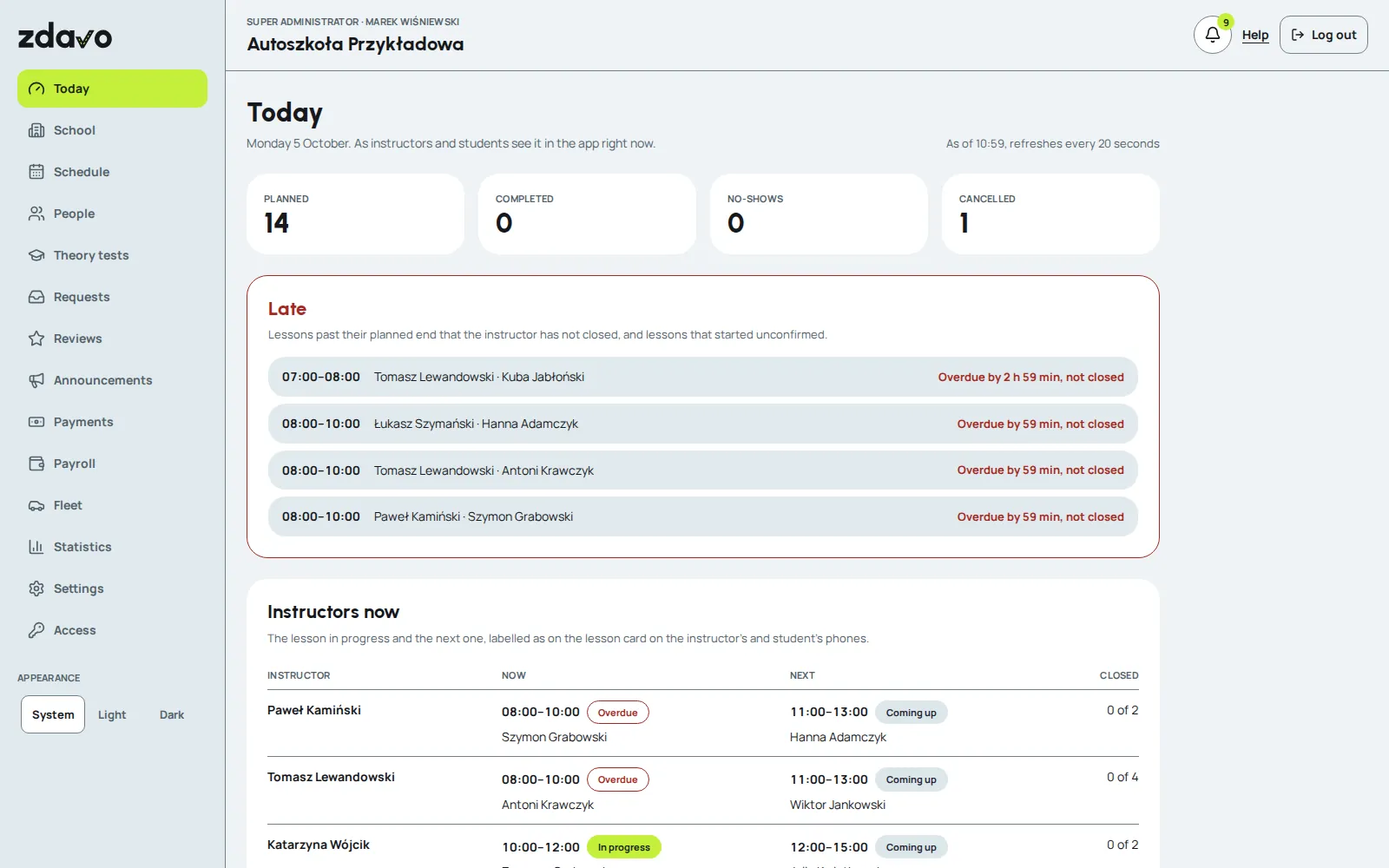
Office panel: the "Today" screen with the day's lessons, late lessons and instructors on the road.
Office and school

The whole school on one screen.

  • Every instructor's schedule on one timeline, so gaps show at once.
  • The "Today" screen: lessons in progress, late lessons and matters waiting for a reply.
  • Announcements to everyone or to selected people.
  • Student payments, instructor payouts and a fleet with inspection reminders.
  • Booking and cancellation rules set up for your school.

Plus hundreds of little things: 11 languages, light and dark mode, your own notification sounds, an app PIN, text that doesn't disappear halfway through typing, and a lesson added to your phone's calendar with one tap.

Try it

Click through the real app.

This isn't a mock-up. Below runs the same app we test on phones, connected to a sample school. Pick a role and see how it works.

Try this:

  1. Open “Book a lesson”, pick a free slot and book a lesson.
  2. Find it in “My lessons”. Move it or cancel it.
  3. Set up the slot sniper in “Book a lesson” and have a look at “Course path”.
Open in a new tab

Demo version in the browser · sample data · reset to the starting state every hour. Don't enter real data.

Features

What already works and what we're building.

Every feature has its state here: “Ready” works in the test version, “Being built” is under way right now, and “Planned” is waiting its turn. We work out the state from the build plan, so the list changes as the work progresses. 29 of 39 features already work.

Student

  • Ready

    Book a lesson without calling

    Free in the evening, but the office is already closed?

    You choose an available instructor, a time and the lesson length. The booking goes straight into the schedule, following the school's rules. No waiting for a call back.

  • Ready

    Your slot just opened up

    Thursday morning suits you, but every lesson is taken?

    You set the days, hours and instructors that work for you. When a matching slot frees up, you get a notification and can book it. No need to keep checking the calendar.

  • Ready

    A free lesson at short notice

    Someone cancelled a lesson. That time happens to suit you.

    Zdavo highlights free slots coming up soon and notifies interested students. You can get an extra chance to drive, and the instructor can fill the freed-up hour again.

  • Being built

    Your next lesson at hand

    The time and meeting point don't have to get lost in your messages.

    On iPhone, a card on the lock screen shows your next lesson and a countdown to the start, so you can check the key details without opening the app. The Android card is planned.

  • Ready

    Know what's next in your course

    Paperwork, theory, lessons. What's done, and what's still ahead?

    You see the next stages of the course, things to sort out and the hours you've driven. Zdavo helps you find your way through the whole course, not just your next lesson.

  • Ready

    To your next lesson with a clear focus

    After a week it's easy to forget a tip from your last lesson.

    You can go back to the notes your instructor shared and to your own notes. Before the next lesson you'll recall what's going well and what still needs work.

  • Planned

    Go back over the route you drove

    Want to recall a junction or a manoeuvre you practised?

    If you turn recording on, the lesson route stays in your history with its stops and marked places. Something to come back to when talking the exercises through. Route recording is optional.

  • Ready

    Agree on a meeting point

    Easier to start the lesson by your university than at the school office?

    If the school offers this option, you mark a proposed start and end point on the map. The instructor accepts or declines it. Until then, the places set by the school apply.

  • Ready

    Easier to stay with your instructor

    Learning well with someone? You'll find their slots more easily.

    You add favourite instructors and narrow the calendar down to their availability. The instructor's profile shows their experience and reviews before you choose your next lesson.

  • Planned

    Extra lessons at a clear price

    Need more practice before the test?

    You see your school's offer of hours and packages and send a request in the app. Once the package is approved, you book more lessons. The school sets the terms and the payment method.

  • Being built

    Theory with your results history

    You're taking practice tests. It helps to see how you're doing.

    Tests and results live in your Zdavo account, and your instructor sees your theory progress. Active students of schools on Zdavo get 3 free tests a day. Buying unlimited access in the app is planned.

  • Ready

    A mock exam like the real one

    At the exam, the time for each question counts too.

    32 questions from the official question bank, one at a time, with time to read and time to answer, just like at the exam centre. An answer after the time is up scores 0 points. At the end you get your result with the time of the whole exam and of each answer. You can also take the exam in English, German or Ukrainian.

Instructor

  • Ready

    Next week without copying it out

    Similar working hours don't mean building the schedule from scratch.

    You copy selected days and use repeat rules. Zdavo proposes the following weeks, and you check them before publishing. You can also enter lessons booked earlier, outside the app.

  • Ready

    Fewer gaps between lessons

    A 45-minute break is too short for another lesson.

    Zdavo limits booking times so that no breaks shorter than an hour appear between lessons. The remaining hours are easier to fill.

  • Ready

    Let people know about a free slot

    Someone cancelled a lesson. No need to start working through a call list.

    You send a notification to the students with access to your schedule, according to their settings. When a slot comes back up for booking no more than 48 hours before the lesson, Zdavo notifies them automatically.

  • Planned

    Cover with confirmation

    A change of plans doesn't have to mean cancelling the whole day.

    You find an available instructor and send them a request to take over the lesson. The student is informed and can decline the change. Once the cover is accepted, the pay goes to the person who teaches the lesson.

  • Planned

    Your next lesson in view

    Between lessons, quickly check what's next in your plan.

    The day view brings together lesson times and your next students. On supported phones, a card on the lock screen also shows the key details of the next or current lesson.

  • Ready

    Know where you left off

    Even when someone else taught the previous lesson.

    The student's profile shows their lesson history, hours driven and the instructor notes available to you. It's easier to prepare the next lesson and keep the learning consistent.

  • Ready

    Hours ready for payroll

    The end of the month without rebuilding every lesson from the calendar.

    The report sums up the lessons taught and the hours. When the school assigns you a rate, it also works out your pay. You can download the summary as a PDF.

  • Ready

    Car matters reach the office

    A fault, refuelling, the mileage — every piece of information has its place.

    In the app you find the details of your assigned car, report a problem and fill in the information the school needs. The office sees it under the right vehicle.

  • Ready

    Chat with the office in the app

    Office matters don't have to get lost in private messengers.

    You write to the school office in the app, with a topic and a photo or a PDF, and the office replies from the panel. When the office writes, you get a notification.

Office and school

  • Ready

    The whole schedule in one view

    See where free slots are missing and where there's still room.

    You compare instructors' schedules and check bookings and free hours. The office plans work based on the whole school, without collecting information from each person separately.

  • Ready

    Fewer calls about lesson times

    “When can I come for a lesson?” — the answer will be in the app.

    The student picks and books an available slot themselves, even after the office has closed. The school sets the rules, and the instructor and the office see the booking in the schedule.

  • Ready

    Cancellations on clear terms

    A late cancellation doesn't have to mean a separate conversation every time.

    You set the cancellation rules, and Zdavo applies the agreed warnings and booking restrictions. Students know which rules apply at your school.

  • Ready

    Your school sets the rules

    Branches can work differently. They don't need separate systems.

    You set lesson lengths and the rules for booking, cancelling and access to instructors. Shared settings cover the whole school, and you can adjust selected ones for a particular branch.

  • Ready

    Car deadlines under control

    Inspections and insurance shouldn't catch you out mid-week.

    We bring together inspection, insurance and service dates with mileage and refuelling data. Instructors' reports go into the history of the right car.

  • Ready

    A school that's easier to get to know

    A prospective student will see more than a name and a phone number.

    The profile brings together information about the school, its instructors, its fleet and verified reviews. An interested person sends an enquiry straight to the school, and the office gets in touch about the course.

  • Ready

    Getting started step by step

    A new system shouldn't leave a school with an empty panel.

    Eventually, the school's application, documents and account activation will go through an online process. After verification, a tutorial guides you through adding branches and instructors and setting the rules.

  • Ready

    The school's day on one screen

    In the morning you want to know what's going on before the phone rings.

    The "Today" screen shows the day's lessons, late and unclosed lessons, every instructor with their current and next lesson, and the matters waiting for the office to reply. It refreshes by itself every 20 seconds.

  • Ready

    Every student's theory

    Who is ready for the internal exam, and who has stopped practising?

    One list of all students' mock exams and practice: last and best score, mastered questions and last activity. Filters show who is ready for the internal exam and who hasn't practised for a week.

  • Ready

    Exam results and your own pass rate

    How many of your students pass at the first attempt?

    With each student you record the date and result of the state theory and practical exam, and students can add their own. From these results Zdavo works out the school's pass rate at the first attempt and across all attempts, also per instructor.

  • Ready

    School statistics

    How did the month, quarter or year go?

    Lessons held, no-shows and cancellations compared with the previous period, how much of each instructor's schedule is used, who cancels lessons and how many students use the app. You can download everything as a CSV file.

  • Ready

    Office matters on your phone and by e-mail

    You don't have to sit at the panel all day.

    Urgent matters, such as new applicants or car faults, arrive at once by push or e-mail, and the rest in one daily summary. Everyone in the office chooses what they get and how, and sets their own quiet hours.

  • Planned

    A pilot in driving schools

    Before Zdavo reaches everyone, we will test it on real courses.

    We will launch Zdavo in a few schools: accounts, training and a guide, then four weeks of real lessons, fixes and a report. You can sign your school up for the pilot with the form on zdavo.pl.

For everyone

  • Planned

    Reviews backed by real experience

    What matters is that a rating comes from learning at that school.

    We link reviews to completed lessons or confirmed course completion. We have also planned document verification for people who learned outside Zdavo.

  • Planned

    Schools that are easier to compare

    The number of stars alone doesn't tell the whole story.

    The ranking brings together school profiles and verified reviews. If we obtain the right data, we'll also show pass rates with their source and method of calculation — so it's clear what you're comparing.

  • Ready

    Questions on the road to a licence

    Someone before you was looking for the answer to this question too.

    The forum will be a place for questions about the course, paperwork and experiences of the test. You can save useful threads to come back to them when you need them.

  • Ready

    Zdavo in 11 languages

    Not every student and instructor speaks Polish every day.

    You can switch the app, the office panel and the website to one of 11 languages: Polish, English, German, Ukrainian, Czech, Slovak, Lithuanian, Romanian, Spanish, French or Italian. E-mails and notifications come in the language chosen on the account.

  • Planned

    Zdavo on the App Store and Google Play

    Today you can try the app in the demo and in test versions.

    First test versions on TestFlight and in a closed Google Play test, then, after the pilot, the production launch and the app in the stores for everyone.

How Zdavo is made

The home stretch.
And we're coming
out to you.

Zdavo was meant to be a simple app. With every conversation with instructors, students and driving school offices it grew, until it became a system for the whole industry. Before it reaches everyone, we want to polish it together with you.

  1. Now

    Polishing it together with you

    We collect feedback from the demo, from conversations and from social media. Every good suggestion makes it into the app.

  2. Next

    A pilot in a few schools

    Real courses and real students. The first weeks will show what still needs improving, and we'll certainly improve it.

  3. Finally

    Launch for everyone

    Zdavo for every driving school in Poland, once we agree together that everything works the way it should.

Build progress92%

We work it out from the build plan rather than typing it in by hand.

Pilot for driving schools

Zdavo in your school.

We're looking for schools to test lesson booking and working on a shared schedule with. We'll help set up the accounts and settings, and we'll use the feedback from the office, instructors and students in our further work.

No strings attached.

We're collecting applications now. Zdavo is under construction.

Prices

The first month of the pilot is free. Then, per month:

  • PLN 199School subscriptionThe office panel, a shared instructor schedule and students booking lessons in the app.
  • PLN 39Per instructorAn instructor account in the app: schedule, lessons and students.

Example: a school with 5 instructors pays PLN 199 + 5 × PLN 39 = PLN 394 a month.

Prices include VAT.

  1. Sign up your school.Give your contact details in the form.
  2. Let's talk about how you work.We'll go over the terms of taking part and the scope of the pilot.
  3. We'll prepare the start together.We'll help with the school's accounts and settings.
Write to us

Email: kontakt@zdavo.pl

Zdavo statistics and Meta ads only with your consent. You'll find information about applications and server logs in the privacy policy.

Sign up your school

We will use the form data to contact you about the pilot. Contact about data: rodo@zdavo.pl. The controller and details are given below and in the privacy policy.

Information on data processing

Version 5 of 4 October 2026

Contact about data: rodo@zdavo.pl. Controller details: in the privacy policy.

Kto jest administratorem Twoich danych.

Administratora danych podanych w formularzu (imię i nazwisko oraz adres korespondencyjny) wskazujemy w polityce prywatności. W sprawach danych osobowych napisz na adres e-mail podany powyżej albo listownie na adres z polityki prywatności.

Po co i na jakiej podstawie przetwarzamy dane.

Używamy ich, żeby odpowiedzieć na zgłoszenie szkoły jazdy do pilotażu Zdavo, skontaktować się z Tobą w tej sprawie i przygotować warunki pilotażu. Podstawą jest nasz prawnie uzasadniony interes, czyli kontakt z osobą, która zgłasza szkołę (art. 6 ust. 1 lit. f RODO). Jeśli prowadzisz szkołę jako jednoosobową działalność, podstawą są też działania na Twoje żądanie przed zawarciem umowy (art. 6 ust. 1 lit. b RODO).

Jakie dane.

Nazwa szkoły, miasto, imię i nazwisko, telefon, e-mail i liczba instruktorów. Serwer zapisuje też datę zgłoszenia i adres IP, żeby chronić formularz przed nadużyciami.

Komu je powierzamy.

Firmie, która udostępnia nam serwer w Polsce (OVH), dostawcy naszej poczty e-mail i Google Chat (Google, usługa Google Workspace) oraz Anthropic, który tworzy krótkie streszczenia maili przychodzących na kontakt@zdavo.pl (także powiadomień o zgłoszeniach) i nie trenuje swoich modeli na tych danych. Nie sprzedajemy danych i nie przekazujemy ich do celów marketingowych innych firm.

Przekazanie poza Europejski Obszar Gospodarczy.

Google może przetwarzać dane poczty także poza EOG, a Anthropic przetwarza je w USA. Chronią je wtedy standardowe klauzule umowne zatwierdzone przez Komisję Europejską (u Google także mechanizm EU-US Data Privacy Framework).

Jak długo.

Do zakończenia rozmów o pilotażu, najdłużej 12 miesięcy od ostatniego kontaktu. Jeśli podpiszemy umowę, dane potrzebne do jej wykonania przechowujemy przez czas umowy i okres przedawnienia roszczeń. Adresy IP z ochrony formularza usuwamy po 30 dniach.

Twoje prawa.

Możesz żądać dostępu do danych, ich sprostowania, usunięcia lub ograniczenia przetwarzania, a także wnieść sprzeciw wobec przetwarzania opartego na naszym prawnie uzasadnionym interesie. Jeśli podstawą są działania przed zawarciem umowy, możesz też żądać przeniesienia danych. Masz prawo wnieść skargę do Prezesa Urzędu Ochrony Danych Osobowych (ul. Stawki 2, 00-193 Warszawa).

Czy musisz podać dane.

Nie, ale bez nich nie odpowiemy na zgłoszenie. Nie podejmujemy decyzji w sposób zautomatyzowany i nie profilujemy.

Więcej w polityce prywatności.

Privacy policy
Questions

The questions we hear most often.

Your question isn't here? Write to kontakt@zdavo.pl or on Messenger.

How much does Zdavo cost?

Zdavo is free for students. The driving school pays a monthly subscription and a fee for each instructor. The price list and the pilot terms are in the “Pilot” section above.

Does the student have to pay for the app?

No. Students use Zdavo for free if their driving school works with Zdavo.

When will Zdavo be available?

We're on the home stretch. First a pilot in a few driving schools, then the launch for everyone. We'll announce the date once the pilot confirms that everything works the way it should.

Which devices does it run on?

Students and instructors use the app on iPhone and Android. The office works in the browser, without installing anything.

Is the demo on this page the real app?

Yes. It's the same app we test on phones, in a browser version and with a sample school. The data is fictional and resets to the starting state every hour. The forum, chat and notes are view-only in the demo.

What about the students' and the school's data?

Each school sees only its own students, instructors and lessons. Connections are encrypted, and signing in to the office panel has a second step. The details are in the privacy policy in the footer.

How is Zdavo different from other apps for driving schools?

We're not making yet another booking app. We're building a system that connects the student, the instructor and the office on the same, up-to-date data, and we're refining it with people from the industry before it reaches everyone.

How can I help?

Click through the app and write to us about what's missing, what's unnecessary and what surprised you. We read every message.

Tell us what to improve.

What are you missing? What's unnecessary? What do we deserve criticism for? Every answer helps build a better Zdavo.